EN
Blog
- If you move that note to another folder in your vault, the page address will change if you update it. And the last thing you want is your site pages changing addresses.
- I’m not an SEO specialist, and there is conflicting information about this online, but some say the address format is an important signal. I have no idea whether it’s critical or not, but the address created by Obsidian Publish looks horrible.
- Wait for four hours before sharing the permalink on social media.
- Use the original link instead. That link will always exist, even if you create a permalink. Also, it doesn’t take four hours to show the image.
As a Star Trek fan, I had no choice but to immediately click on that YouTube thumbnail: “Official Trailer | Star Trek: Khan.” It was impossible not to!
When I started watching it felt like a game promotion, which was a bit frustrating since I’m not a gamer. But like any true fan, I didn’t give up.
“George Takei? This is definitely a game,” I thought, yet I kept watching. Then came the big reveal: It’s a podcast! 🤯 Wow, I was not expecting that.
I still need to test sharing YouTube videos and articles from my main site, but I’m enjoying the idea of having a Social Hub so far. Especially for sharing short posts like this one. On the other hand, I’ll need to rethink my content organization strategies for my main site because this new “portal” also doubles as a timeline.
As for my videos, I’m starting the tests now 😊. I’ve set them to automatically be posted on my Social Hub, which will in turn send them to Mastodon and Bluesky. So, just a heads-up: some posts might look a little rough around the edges on my Bluesky and Mastodon as I work out the possible glitches.
Have a great week 😉
Do you know those shelving units from #Ikea made of cubes? This one is three cubes high, and I keep it next to my incredibly small home office desk (also from Ikea). The desk itself has already gone through some #IkeaHacks, but I still have many plans for it!
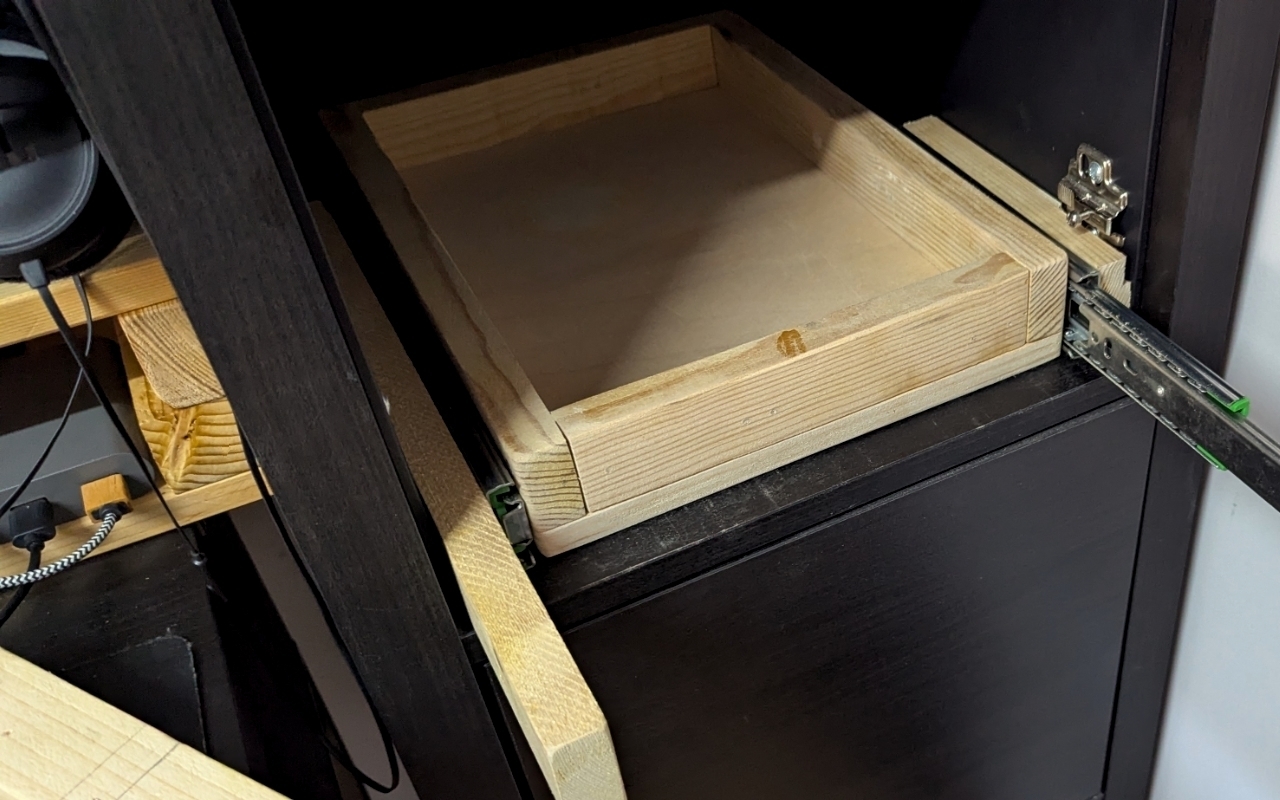
Anyway, it was time to make these boxes more efficient. As you can see in one of the pictures from yesterday, the base of the cube at the top of the stack almost aligns perfectly with my desk. So, the plan is to create a platform that I can pull out and put things on when I’m working at the desk. This is what that sketch I recently shared was all about.
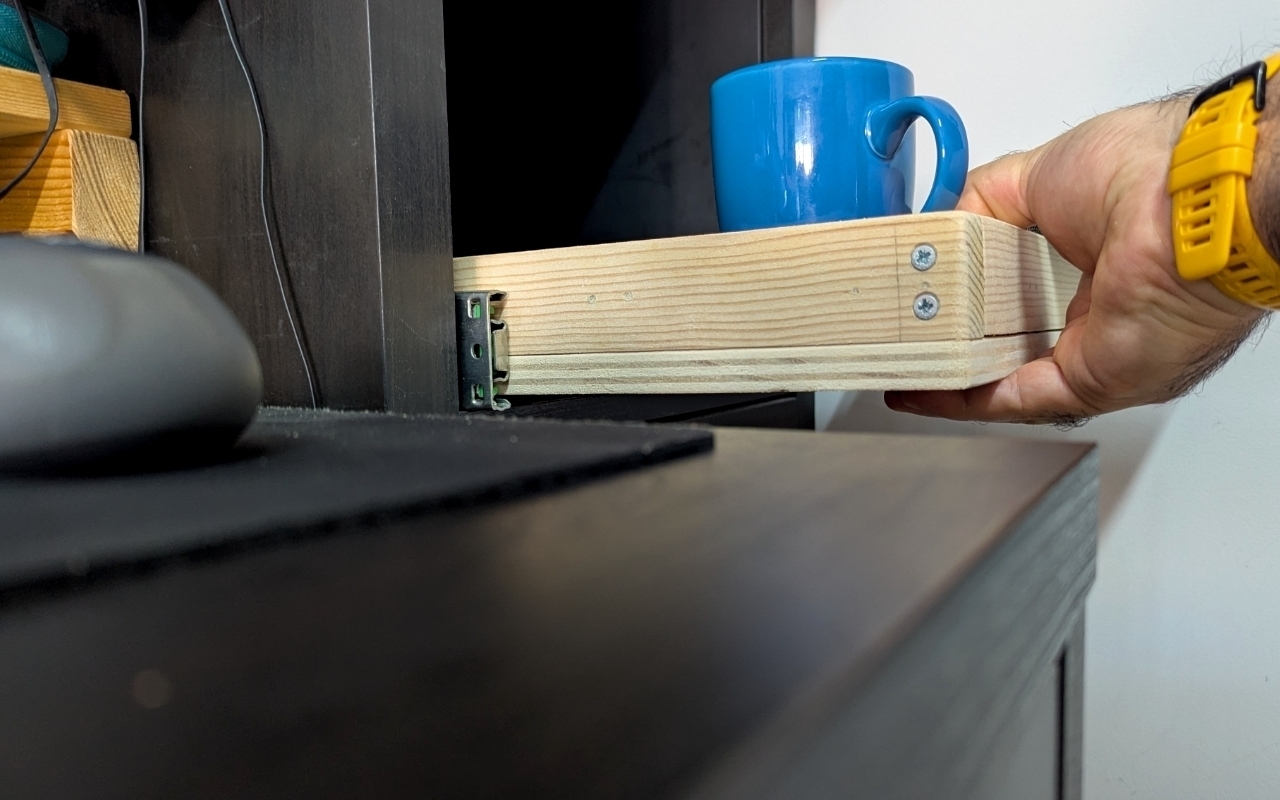
In addition to the platform that will slide out like a drawer, there will also be a shelf. I’m not yet sure if it will slide with the platform or stay inside—that’s for future me to decide! For now, the plan is to finish the platform section.
I’m testing a new idea! I’ve set social.vladcampos.com as my Micro.blog domain and configured it to cross-post to Mastodon and Bluesky.
Now, I can use Micro.blog to post links to YouTube videos (from both channels), and to articles I publish on my main site. As for photos, and short updates, I can do it directly on Micro.blog. This automatically does two things: it shares everything on Mastodon and Bluesky, and simultaneously creates an RSS feed with all my published content.
I think this has the potential to work really well, but I need to test it for a few days!
P.S. This post was created using the setup above 😊
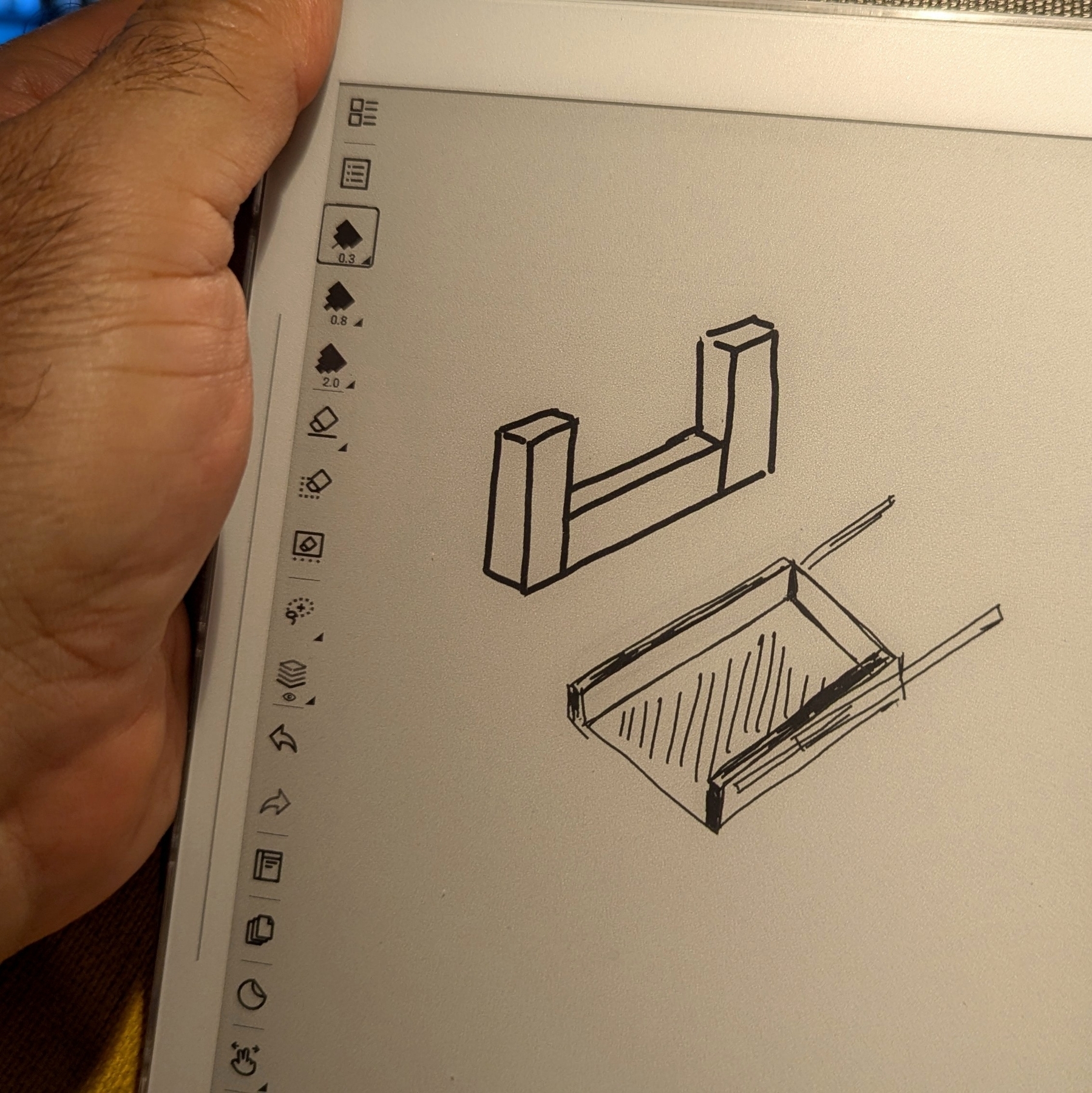
I’m trying to visualize a project I’ve been brewing for a long time. It’s a small one, but it demands a few precisely cut pieces of wood, and that’s why I’ve been postponing it for a while. But this coming weekend may be it. Wish me luck with those cuts! 😁 #Maker #Woodworking #Supernote
It seems like you don't have to wait four hours like they said in the official Obsidian Forum.
After additional experiments with sharing the #Obsidian-Publish permalinks on social media, I discovered that if I do so two hours after the page goes live, the image will appear on the social media post. I haven’t had any luck with a one-hour wait, though.
Next, I’ll try one and a half hours 😉
UPDATE: So, it looks like my two-hour theory is a bit hit or miss. I’m adding this update because it took a bit more than two hours for the image on this one to appear.
My Obsidian Publish infinite loop. The saga of creating new problems by solving others.
It’s incredible how solutions can have a side effect, creating new obstacles. And I secretly love dealing with that challenge.
Like usual, I’m sharing something I just learned. But let’s begin with the issue. If you use Obsidian Publish to post your notes, the address of the page will be something resembling the path to the note in your vault, which creates two headaches.
The solution to both is adding your own address as a permalink, which Obsidian Publish allows you to do with a property:
Long story short, all my notes have a permalink, but of course, that created a new problem. Do you know when we publish a link on social media and it creates a miniature with a thumbnail and some details about that post?
Obsidian Publish has some properties that you can use to tell the social media site where to look for that information: cover: or image: for the thumbnail and description: for the description. You can learn all about this on the Obsidian Help site.
That set me on a quest that led me to this Obsidian Forum post: “Pages with permalink take longer to have a social preview.” There’s a long conversation there, but here’s the TL;DR:
How to Find the Original Link
Open the Obsidian command palette, and type Publish: open in live site. That will first open the page using the original address and then switch to the permalink.
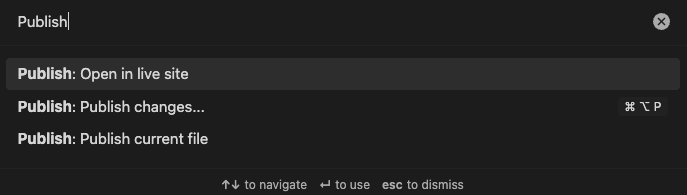
It’s too fast to see, but if you go to your browser history, you’ll notice that page appearing twice in the list. The older one has the original address. Right-click on it and copy the link.

Yes, I know what you are thinking…
I agree. It’s incredible how there’s always a side effect creating new problems. But don’t worry, you’ll be the first one to know when I find out how using the original address creates new complications.
Returning to a beloved book universe.
The last time I was so deeply involved with a universe, a book universe, was when I was reading my favorite author to this day, Fernando Sabino.
He would repeat sentences, ideas, and situations across all these completely unrelated stories and books, so I always thought he was talking about his life, but with a little touch of fiction. One could say that there was a universe—the author’s life universe—a parallel world with countless things that readers could relate to and understand.
This was many, many years ago. Decades ago. I read several other authors after finishing all his books, but none of them were able to create the same type of connection.
I’m currently on book two of The Expanse series. About 70 percent of that book, and I can’t wait to read book three. By the way, are there six or nine books? Anyway, what I know is there’s an end to the saga, and I’m already sad about that.
What am I supposed to do when I read all the books?
When I asked Gemini Flash if it could do a specific task or if I should use Gemini Pro for that, it told me that there was no need to use Pro for that. Then, it came up with a detailed explanation of why it was perfectly capable of doing that and what kind of tasks I should ask Pro to do. It was hilarious. 😆 I could only picture a worker telling me something like:
“There’s no need to call my boss. I know how to do that.”
Tweaking some Obsidian plugins (weekend housekeeping)
Yesterday, I spent some time adjusting the settings of two Obsidian plugins — Voicenotes and BookFusion. That inevitably got me thinking about how cool it is to have apps and services automatically send information to a centralized space. What’s even cooler is that even if Obsidian ceases to exist tomorrow, all the files will still be organized and available in my computer’s file system.
BookFusion
When making some small adjustments to what I showed in a recent video, I noticed that the plugin isn’t creating “Lists” in my vault. I even went back to my video and realized that this issue was already present back then.
Anyway, if you look at the images below, you can see, by the lighter green link, that the notes “Completed” and “Currently Reading” don’t exist in my Vault. In other words, the plugin isn’t creating them, even though I have all “Index” options set to synchronize.
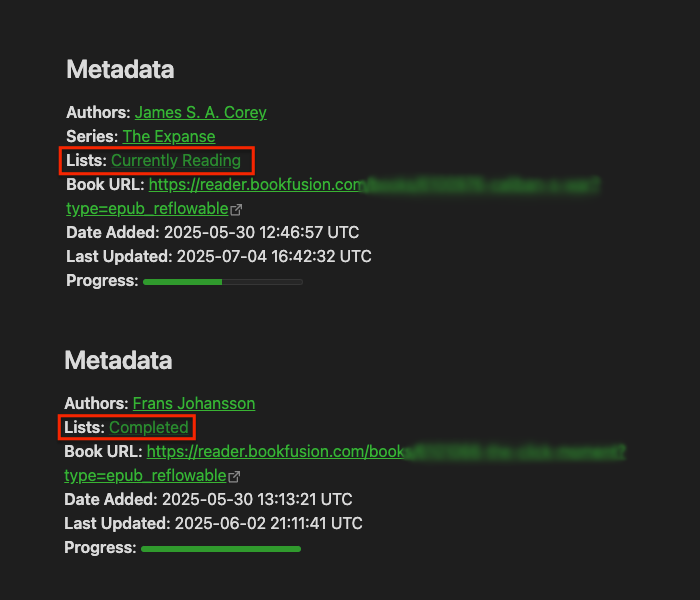
By the way, if you’re having trouble understanding what I’m talking about, please watch this video.
Looking at the images below from my BookFusion dashboard, you can also see that the book Caliban’s War is in the “Currently Reading” list and the three others are in the “Completed” list.
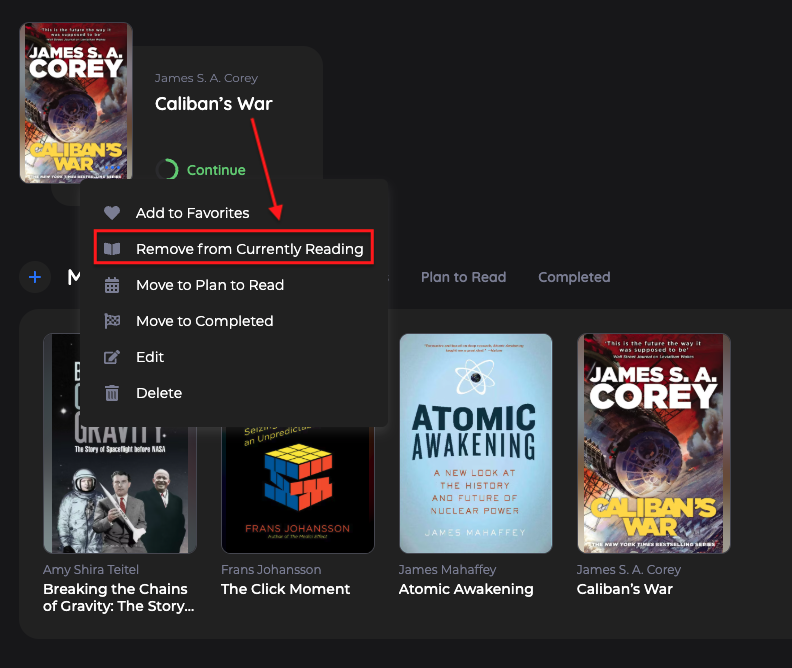
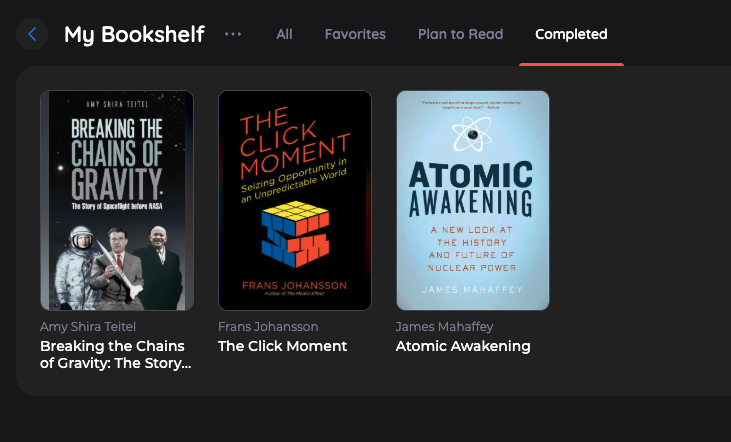
It’s possible I’m doing something wrong, but after checking all settings and not being able to figure out the problem, I decided to email the BookFusion team. I’ll update this post when I hear back from them.
Voicenotes Unofficial Plugin
I’ve been testing the Voicenotes Pages feature to produce a video about it, which is why I decided to also dedicate some time to make adjustments to the plugin settings.
Again, I’m not sure if I’m the one doing something wrong, but it looks like the variable that creates the title for the note is also including the date.
Then, there’s a suggestion. As you know, I like to have all my files in the Files folder in my Timeline, but the plugin doesn’t let us choose where to save Voicenotes attachments. My suggestion was to allow us to do that.
That’s it for this one. I just wanted to share the recent updates because, as you know, I’m always tweaking things around here.
Experimenting with Voicenotes integration into Obsidian blog
Note: Originally posted on my Voicenotes Page.
I’m using the unofficial Voicenotes plugin in Obsidian and I have it set to download everything. Not only the text but also the audio, the attachments, everything. I even have some properties that will capture links, the title, and a lot of other information.
So, I’m here thinking that maybe it is possible to create a copy of this post—that I’m adding to Voicenotes Pages—in my Obsidian blog.
Well, it’s not “maybe”, it is indeed possible because, ultimately, it’s also being created as an Obsidian note. All I have to do is set the plugin’s template to download the post and everything else but with the appropriate properties, the ones that I use to publish on Obsidian Publish.
Hmm, this is an interesting experiment. Let’s see how it goes.
AI as a powerful Tool, not a Commander.
It’s tempting to outsource more and more tasks to powerful AI tools. But how far should we go? Have we already reached a point where we’re blindly handing over too much control? And what harm is this already doing to our growth and critical thinking?
In a recent post, I discussed keeping AI siloed, and here’s an example of what I meant. When I’m with a client, I take notes while we’re talking. This helps me better process everything and puts my brain into an intentional mode. Which, in turn, helps me come up with important questions to ask in real time and also triggers ideas for solutions to their workflow.
Even so, sometimes real-time note-taking isn’t possible. For instance, the other day, when I was helping an independent professional, I was demonstrating how to use the Timeline System to build his workflow by sharing my Supernote screen. In other words, I didn’t have enough hands to type.
However, right after the meeting, I opened Voicenotes, pressed record, and started speaking as if I were typing in real time. If I can’t take notes during a meeting, I make sure to do it immediately afterward to avoid forgetting any essential details. After all, that’s the whole point of taking notes.
I usually write everything out, even if it’s after the fact. But, in this particular case, I had another appointment, and, as I said, I would rather not forget anything. (By the way, any similar application would have worked; I chose Voicenotes because it has a web app.)
After finishing the recording, I went to the web, copied the transcription, and pasted it into the client’s note in Obsidian. There, I fixed the mistakes and added additional details, which ultimately triggered new ideas, also noted down to be shared with the client in the next session.
Yes, I can hear you! Here’s why I haven’t used AI to do everything.
Imagine asking AI to create all the topics for a specific meeting. Then, it emails all participants who, during the meeting, used AI to record and summarize it. Each attendee then asks AI to generate suggestions. Finally, someone consolidates all the suggestions in another AI and asks it to create a plan of action.
You’ve probably seen jokes about this online, but is it that far from reality? If you are afraid of AI taking your job, at least stop helping it by handing everything over on a silver platter.
I know, we’ve passed the point where not using AI is possible. It’s challenging to avoid something that’s excellent for many tasks. However, I strongly believe it is a terrible idea to put it in control. If I had used AI to record, transcribe, and summarize everything, I would never have had the insights, which, in the end, would have made taking the meeting notes pointless.
I created my own AI, but it is not what you are thinking.
As I’ve said many other times, I believe there are some technologies that reached a stage of maturity where they could just be used indefinitely. What many people seem not to know is that it’s possible to go back to enjoying that sweet spot.
If we look back a few decades, it feels like things eventually got out of control. I remember using the iPhone when information and even the OS upgrades were done by connecting the phone to a computer. Back then, apps with online synchronization like Evernote were rare.
At some point, everything started becoming so fast and instantaneous. Not only messages, but almost everything. I’m not old enough to remember when breaking news used to be the next day’s newspaper cover. But before the popularization of the Internet, I remember the “We interrupt this program for a special news bulletin” message on the TV and radio. Now, we get flooded by information about everything all the time. Many times inaccurate or, worse, fake news.
If we stop to think about it, unless you are a reporter, stock trader, or work with anything that is time-sensitive, there’s no practical use for all this immediacy. On the contrary, it generates a lot of stress. As ordinary people, there’s absolutely nothing practical we’ll be able to do with most of the instant information we get bombarded with.
The most recent I-must-be-part-of-it-no-matter-what fad is AI. There’s no reason to use AI for everything, nor is there a need for AI in every single app. Also, just so you know, yes, I do use AI. Every day! But I try to keep it siloed.
Back to my point. Although using or repurposing old tech was something I always did, it feels like I’m doing it more and more these days. I don’t know if it’s because I’m getting older or because I refuse to subject myself to imposed anxiety.
For example, I did try streaming for a while but never stopped using my iPod 5.5 Gen. The modern Supernote I use and love is constantly bringing me back to a pleasant time when I used my Palm for everything. You’re probably aware of my Digital Caveman project. And there are all those apps, like Instapaper, that look and work just like they did a billion years ago. All these are great examples of the point of ‘tech maturity’ I mentioned at the beginning.
Anyway, the more I look at modernity from the perspective of people who are constantly anxious and chasing novelty just for novelty’s sake, the more I think of products and services I should have never stopped using. The good news is that many of them still exist, and after going back to using some of them, I can now clearly see how good they really are, as they have withstood the test of time.
Maybe that’s why I related so much to Kevin Kelly’s “What Technology Wants” book. Not only does he directly challenge the common perception that old technologies become obsolete and vanish, but he also comes up with several examples of technologies, no matter how old, that still exist somewhere. Perhaps in a modified form, for a specific purpose, or in a niche market.
Of course, using old tech or new tech with old tech vibes, like Obsidian, comes with its challenges. It often demands what I call Attention & Intention, my kind of ‘AI’. For example, I see people complaining all the time about how complicated Obsidian is. It’s difficult to disagree with that, but doing things with Attention & Intention means that you were paying attention and will probably remember where you stored that information.
I’m not going to pretend I didn’t fall for modern tech promises, like social media. Thankfully, many years ago I started disconnecting from all those toxic spaces, and recently, I’m finding that going back to using RSS to follow blogs is bringing me a lot of joy. I don’t have words to describe how pleasant it is to read like this. I’m overwhelmed by how much great content I was missing.
Of course, it’s not as simple or easy as the infinite scroll provided by a mysterious algorithm with a single mission: keep you hooked, no matter what. No matter what! It comes slowly from here and there: from a conversation you had on Mastodon, a page that appeared in a search result, and even trying to remember the names of the websites of those old friends. But since it’s all done with Attention & Intention, it pays off.
It’s true for all the other non-anxious tech I mentioned above. Adding music to an iPod means connecting it to a computer. To find music, you have to know at least a few things about it, like its name, or the singer, or the album, etc. As for the Supernote, it has a simple OS running on a basic device with a monochromatic display. No browser, no notifications, and disconnected most of the time, much like my Palm used to be. And let’s not even start with all the effort one has to put into an Obsidian Vault.
Next in my wishlist of mindful devices is a Fairphone, most likely running /e/OS.
Attention & Intention is beautiful, pleasant, and, most importantly, relaxing.
Good morning, coffee friends
Following the pre-wetting of the filter with hot water, I add the coffee and pour water over it. What you see in the picture is a top-down view of an AeroPress at that stage.
Now it’s time to add the plunger, wait a few seconds, and, finally, press. I love to cook, by the way, but I really do follow recipes to the letter. Time and quantity are frequently eyeballed.

A few cool things I recently discovered about RSS feeds. Spoiler — they have super-powers.
It feels more like a niche thing these days, but RSS is still a powerful tool.
Even if you don’t know what RSS is, chances are you have it on your blog. What you may not know is how it can help you set up a newsletter and automatically share your blog posts on social media, among other things. Is it worth it? Well, I tried some ideas, and I have a few thoughts to share with you.
Where is my RSS?
This will depend on the platform you are using, but it’s usually something like your-domain.com/rss or your-domain.com/feed. If you don’t see a page like this when you try those addresses on your domain, check your website provider’s help page or search for it on Google. And if you are an Obsidian Publish user, unfortunately all I can offer you is a workaround.
With your RSS feed in hand, we can now work on some integrations.
Mastodon
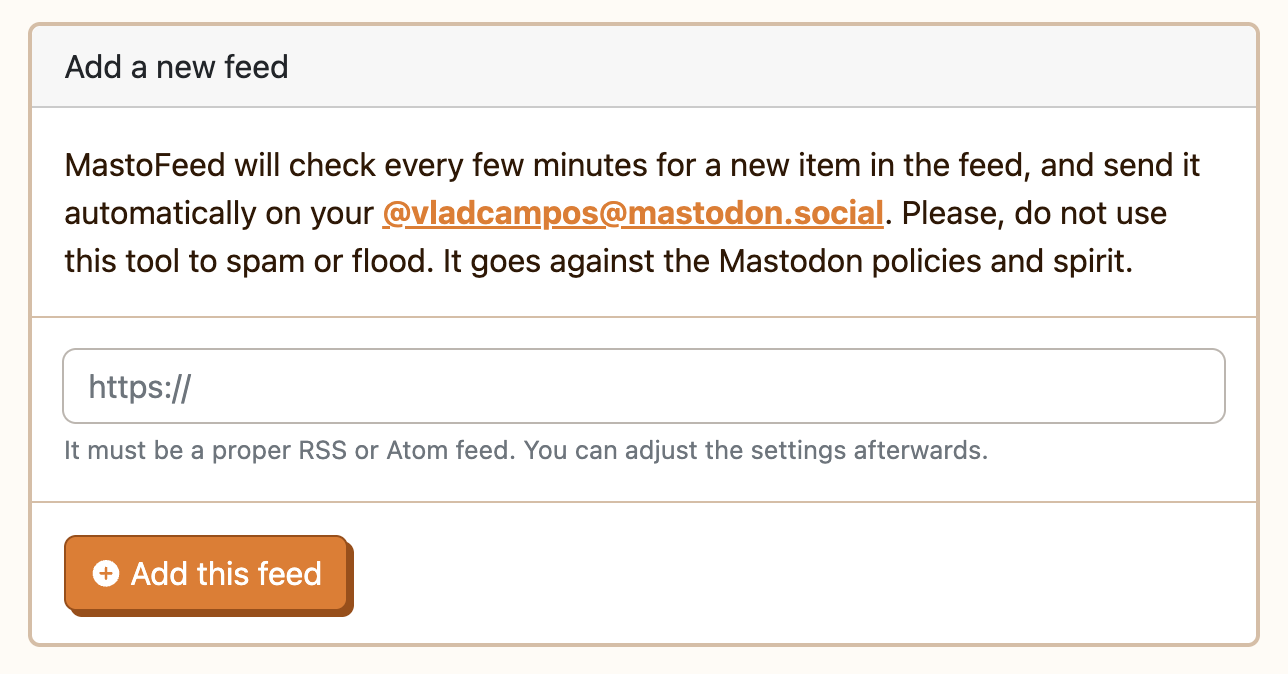
MastoFeed is a pretty cool service I recently discovered. It automatically composes Mastodon posts based on new items that pop up in your RSS feed. To set it up, go to mastofeed.org and log in with your Mastodon account.
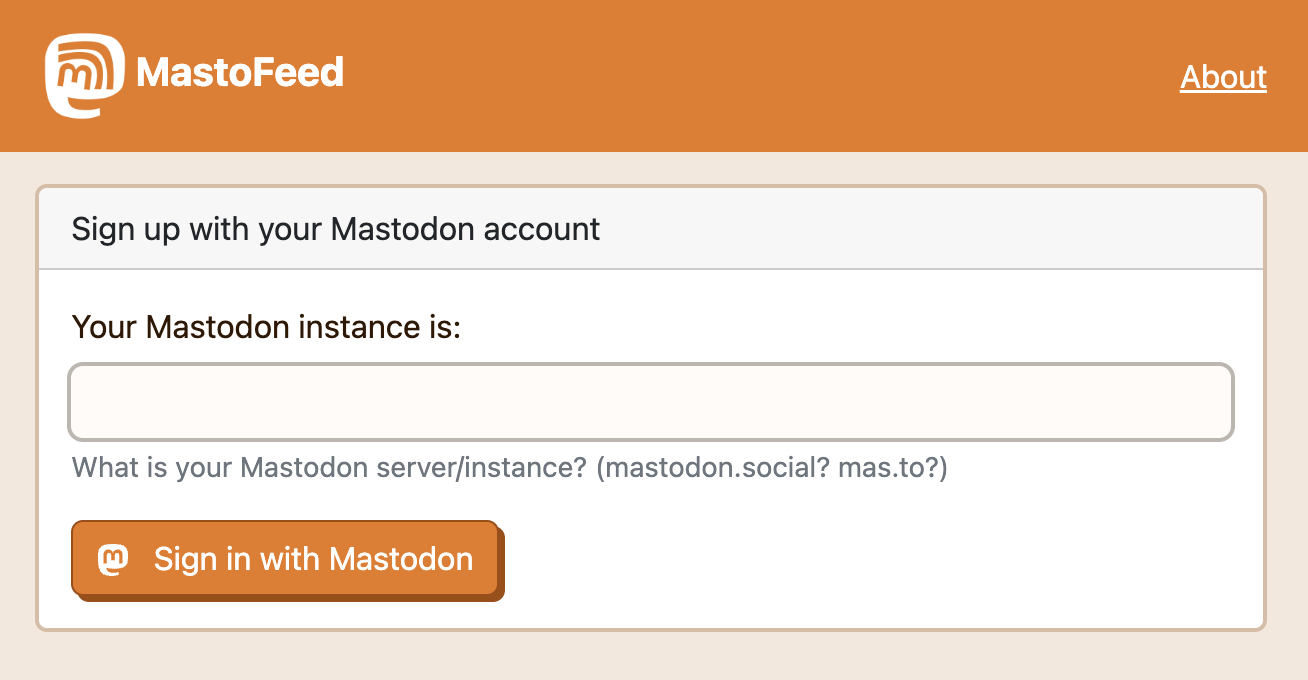
Next, click on the “Add Feed” button, paste your RSS feed address, and add it. Finally, click on “Activate” to have access to some settings.
The box below “Format of the message” is where you can use the variables provided to format the final post. For example, I used:
(TITLE) • (SUMMARY): (LINK)
Below you can see an image of a recent post.
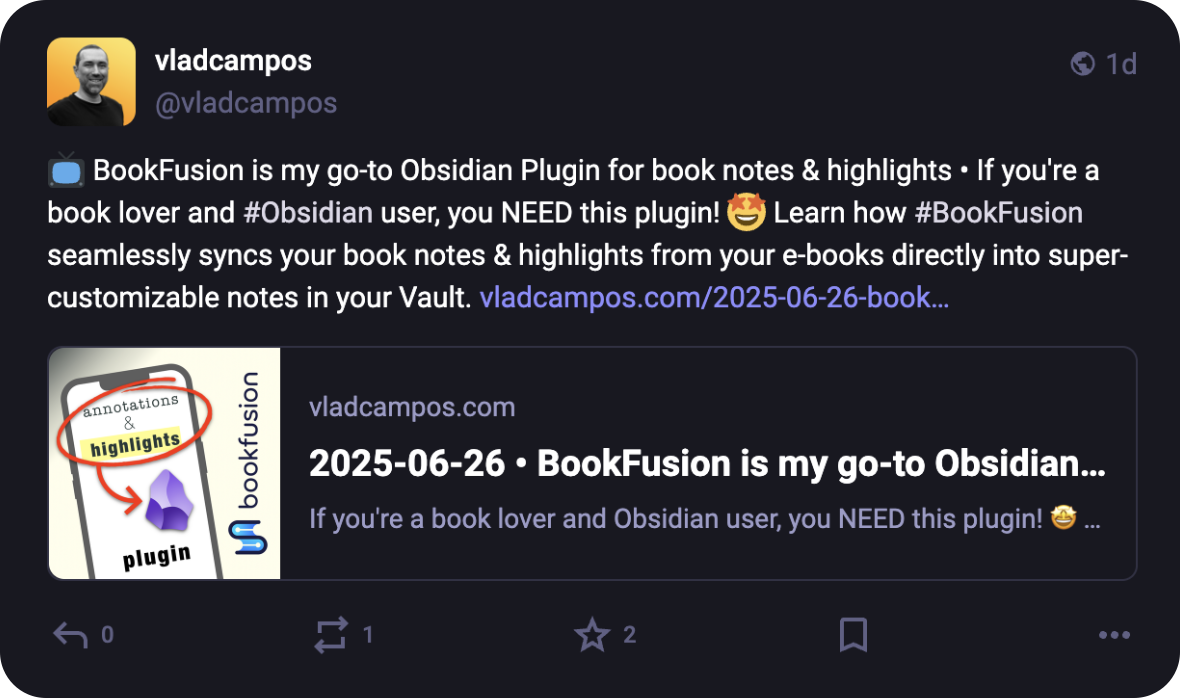
However, despite enjoying all the customizations and how good the final post looks, MastoFeed was taking many hours — around 5–7 — to create the new posts. I understand that it is a free service and all the associated costs, but it is too much, especially when I want to share timely news or a recent thought.
I’m now exploring Zapier and similar services to try doing the same in less time. And I can easily do that because I’m basing the automation on RSS.
Newsletter
This is another automation I only recently found out was possible. It is usually part of a paid plan, but many newsletter providers will allow you to use your RSS feed as a trigger to send emails. And that blew my mind.
I spent most of my time experimenting with two services: Brevo and Kit. Both have very detailed explanations on how to set up your RSS, so I’m not reposting that information here. And as you can customize everything, the final result is something pretty cool. But, yet again, I gave up on the automation.
I’m still using RSS to populate the core of my weekly newsletter, but if you are a subscriber, you know that I like to start the email with a personal touch. It’s just a paragraph or two, but I like to do that, as it makes me feel more connected to the reader.
Update: I discontinued my newsletter. You can still follow all my blog posts on Mastodon
Final Thoughts
If you keep a blog and haven’t yet checked RSS’s extra powers, I strongly suggest you explore this vein. Trust me, you’ll find uses that go way beyond a passive sharing of your posts.
I started typing “what time…” on Google to find out when a store I want to go to opens, and “what time is it” was the first search suggestion in the list. Seriously? It is highly probable that people would be typing that into a computer or phone. The time is already there, right in front of them! 😳 Sometimes, modern life scares me.
🤎 Every morning, I’m inundated by an immense sense of joy as I open Mastodon and enjoy a cup of coffee while looking at the posts tagged with the #coffee hashtag. It is like having a cup of coffee with friends from all over the world.
Refining my note-taking workflow—lessons from Evernote for Obsidian.
As someone who believes that serious note-taking needs a solid system, I’ve frequently encountered a challenge: effectively managing my ever-growing collection of notes.
Dynamically switching between multiple views of the same information is a strategy I used a lot in the past. However, I lost that when I moved to Obsidian, as I find its handling of lists of notes less intuitive than Evernote’s elegant approach.
I can’t think of any note-taking app that handles note lists quite like Evernote. Its “All Notes” list is essentially a dynamic filter displaying all your notes. If you’re an Evernote user, you’ve likely noticed that the list automatically refines as you click on notebooks, tags, and so on, transforming to show exactly what you need. This brilliant method of listing notes is something I truly miss in Obsidian.

When you select a notebook, tag, stack, etc. in Evernote, the items in the list are filtered to show only notes within that group. So much so that you can easily replicate this filtering using the advanced search operators.
For example, typing tag:tag-a in the search box yields the same list as clicking on the tag-a tag. Evernote’s AI-powered search functions similarly; the displayed items adjust based on the elements the AI selects to create the filter.
In Obsidian, however, filtering notes by a tag or using the search box will also list the items, but I’m limited in what I can do with the results. While I can clearly see the list, there’s no way to select all items and, for instance, add a tag to them or move that group of notes to a different folder.
In Evernote, this is not only possible but incredibly easy. You just select and move them to another notebook. While a limit on the number of selectable notes exists now, it wasn’t there before Evernote 10.
This clever way of displaying notes does come with technical challenges, though. For example, I believe the current selection limit was imposed because, in the past, moving long lists often led to significant conflicts.
Because there’s no easy way to filter notes in dynamic lists like in Evernote, I opted for subfolders within my Timeline System in Obsidian. But by doing so, I sacrifice a true timeline of my life’s events, as each type of information is located in a separate subfolder.
I haven’t tested Bases yet, but judging by the official documentation, it appears there’s no limit to the size of lists a Bases file can handle. If true, I’ll finally be able to build a real timeline by creating a single Timeline.base file that lists everything from the subfolders within my Timeline folder. Not only that, but I’ll have access to various dynamic filters within that Timeline.base file.
While I’d prefer not to, if the number of files proves too large for the new Bases feature to handle, I can always split it into yearly files: 2025.bases, 2024.bases, 2023.bases, and so on.
It will not be a perfect replacement for Evernote’s list of notes, as I will not be able to select multiple notes to add tags, move them elsewhere, and any other bulk action. But I’ll at least, have a real timeline and multiple possible filters.
The Bases feature is still in beta, and online discussions suggest the final public version will take some time. Meanwhile, I can ensure my Timeline notes have all their properties populated with the proper data, allowing my Timeline.base to beautifully simulate the visual effect of multiple views of the same list, just as I was accustomed to in Evernote.
Ultimately, my goal with the Timeline System is to create a note-taking system that truly adapts to how we think and behave, allowing us to interact with all the information we deal with in a fluid, intuitive way. Bases seems to be a promising step in that direction regarding using the Timeline System in Obsidian.
What about you? Any plans for the new Bases feature?
Another reason why I love how hackable the Supernote is. It now precisely fits my EDC setup.
That penholder on the Nomad case is very convenient, but when I wanted to bring the Supernote in my EDC pouch, it was always a pain to make it fit. I had to put some pressure on it to fold the holder down while zipping the bag.
Don’t be mad, but I’ve actually thought of cutting it off a few times. Thankfully, I’m not that young and anxious anymore, so I did what I always do in situations like this. Instead of rushing to cut it, I let the search for a solution slowly brew in my brain.

One day, out of nowhere, I had a ‘click’ moment. A good velcro was probably the solution! I grabbed the device, removed it from the case, and, to my surprise, there were just a few stitches connecting the penholder to the case. “No way it will be that easy,” I thought while looking around for my x-acto knife.
It took me just a few seconds to disconnect them. It was so quick and painless that I completely forgot to take pictures or film it. Sorry.
I’ve said this so many times, but here we go again: I love how hackable the Supernote is! Anyway, I then cut a piece of velcro to precisely fit the rectangular space left behind, used contact glue to attach one side to the case and the other to the pen holder, and voilà.
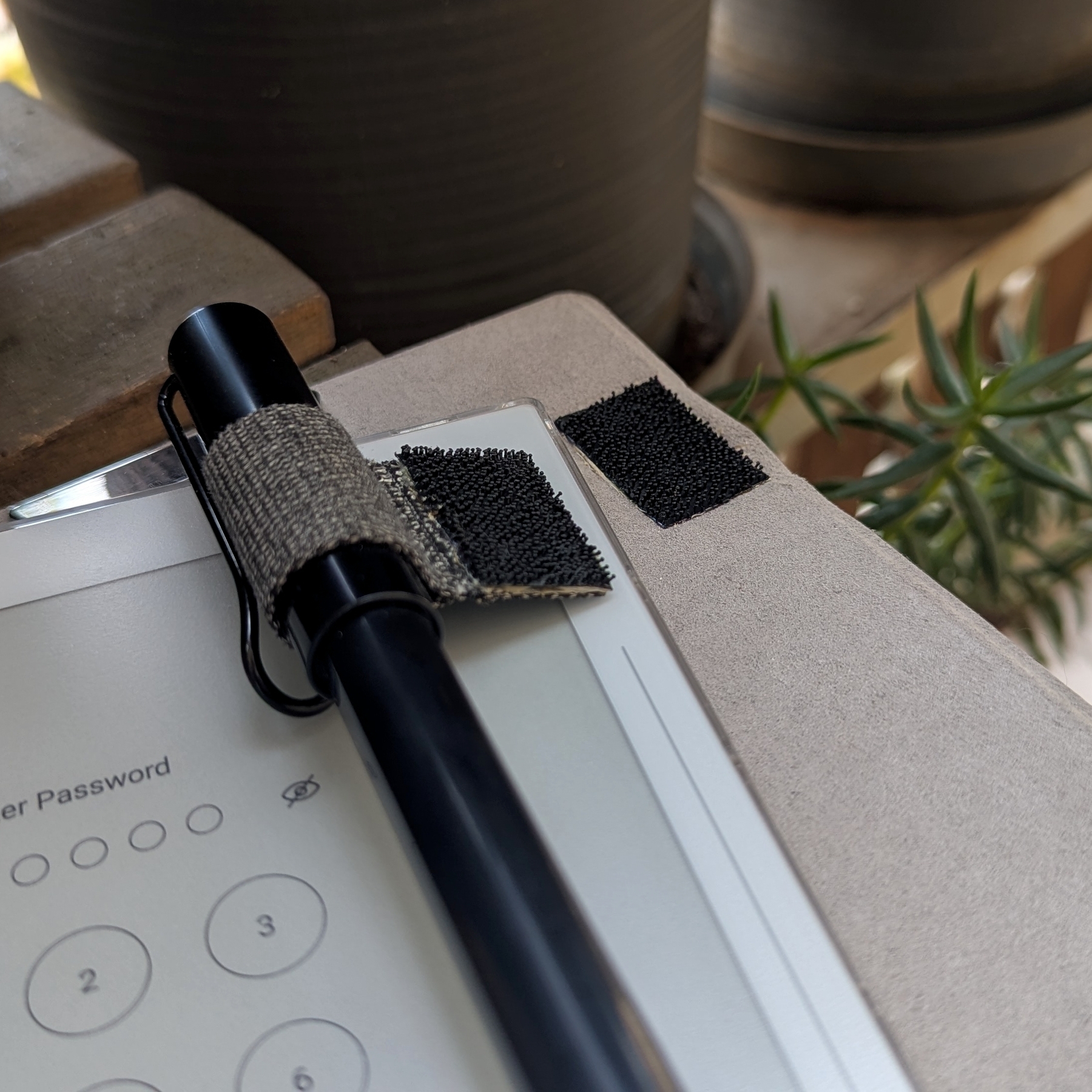
I considered using thinner velcro, but after some tests, it was evident that it wouldn’t hold the pen in place. The 3M strips I ended up using are probably overkill, but I was super excited about my insight, and I already had those in a drawer.
However, because they are a bit thick, the case is no longer flush with the Supernote. Not a big deal, I thought. It’s just slightly raised on the corner where the penholder is, and the magnets are strong enough to keep everything connected.
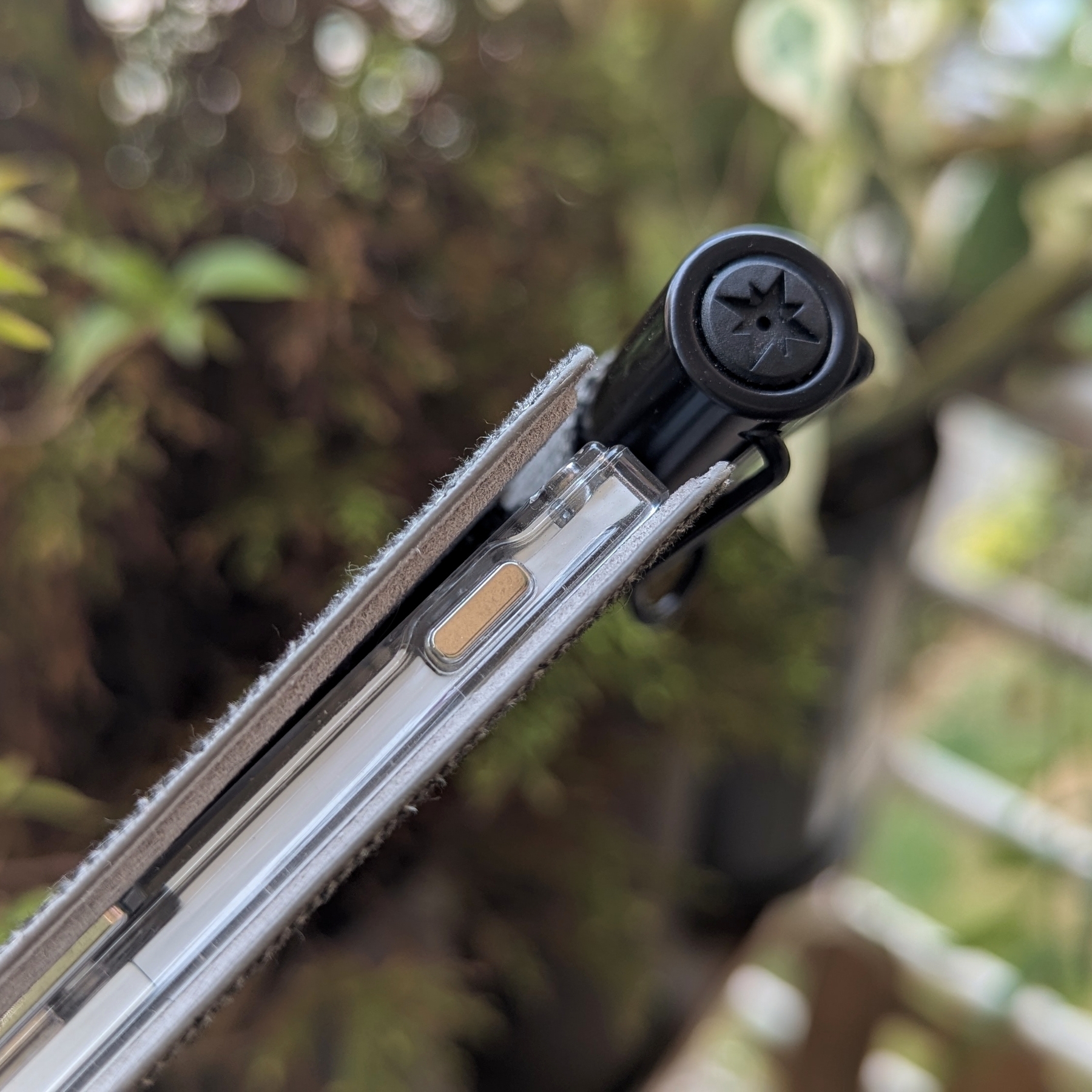
I’ve been using this hack for a few months now and couldn’t be happier. The pen stays attached most of the time, and when I want to bring the Supernote with me, there’s no more fighting with the Peak Design Tech Pouch. By the way, let me know if you’d like to see a video of what I carry with me everywhere and how I organize my EDC pouch!
The day I almost ditched Medium. It turns out it was saving my site.
Where is my site? Even a direct search for my name brought back Medium’s logo at the top of the list. Why is Medium now my main digital footprint? Why did my digital home suddenly vanish from Google’s search results?
My first thought was that either the canonical setting was not working or Medium was ignoring it on purpose.
Maybe it was time to ditch Medium for good, I thought.
It was a classic ‘guessing game’ moment, one I found myself falling into more and more recently, despite my background in the cold, hard facts of research and statistics. My father, my wife, and many people around me are researchers. In addition to that, scientific papers, numbers, statistics, etc., were frequent in my graduation and post-graduation courses.
When did I start jumping to conclusions so easily? Perhaps it’s a byproduct of our social media-saturated world, where speculation often overshadows data.
Anyway, before taking the radical step of telling my readers I’d be leaving Medium, I decided to take a deep breath and start doing some research online to try to understand what was happening.
Among other things, my quest made me aware of the Google Search Console, which was a huge rabbit hole I ended up in. But that’s a story for another time. Anyway, when I came across the explanation “Duplicate, Google chose different canonical than user,” I was affected by another guessing moment and quickly blamed Medium. Again!
At this point, my brain was already at full speed trying to figure out a strategy to fix the “Medium problem” when I checked the “Links” menu and saw Medium at the first position of external links bringing traffic to my site. Not only that, but the number was much larger than the second item in the list.
To give you some context, when you start using Google Search Console, the information is not all there at once. It gets built over the coming days after adding a site to be monitored. That lack of all the data probably also contributed to my guessing state. By the way, the “canonical issue” was about other links that had nothing to do with Medium.
Anyway, that’s good news; it was not Medium. Thank you, numbers! But I was now back to square one.
Obsidian Publish
After a lot of reading and long conversations with Gemini to understand all the tech terms I was coming across, it clicked when it mentioned something about the “Disallow search engine indexing” switch on Obsidian Publish settings. “Oh, s***,” I thought, while that unmistakable feeling of “I did something very wrong” permeated my entire body.
When switching to Obsidian Publish, it took me a while to import all my content from the old website, and I didn’t want Google indexing that big mess. That’s why I turned off the search engine indexing. What I completely forgot was to turn it back on, meaning that I completely erased my site from existence for many months. Unbelievable!
The Bright Side
Since I cannot go back in time, I try to always learn something from my mistakes and also look for the bright side of things. And learn I did. A lot! Not just the ins and outs of SEO, but also how important it is for me to regularly check my own online presence, especially since [[vladcampos.com/Action/💡 Consulting|I run my own business]]. From now on, I must create a task or a calendar entry for the future in cases like this.
Knowing that I would lose Medium’s social element by not publishing there anymore, I had to bring back [[vladcampos.com/Static/Newsletter|my newsletter]], which was a detour that brought me into another deep rabbit hole. I told you I learned a lot.
Remember the better RSS feed I created for my website? Well, I can now set it as the source of my newsletter, which I rebranded as “Friday Fix by vladcampos”. As the name implies, subscribers will get a list with links pointing to everything I shared during the week: articles, short posts, podcast episodes, and videos.
In hindsight, I’d say that the terrible mistake of blocking search engines from indexing my site ended up working as a trigger to making my online presence a bit better.
As for Medium, how many times have you seen articles stating that it is terrible for your site? I’ve seen many of those. But in my case, that couldn’t be further from the truth. Maybe because I always set a canonical link to the original article on my site. Anyway, the Google Search Console is a good place to start if you really want to know if it’s helping your site. In the end, using facts—numbers—is a great way to avoid guesswork.
Overall, have fun!