How to connect your WordPress blog to millions of Fediverse users
Did you know WordPress has a native setting to connect your blog to the Fediverse? With one simple toggle, you can instantly expose your posts to millions of active users.
There’s a simple setting that will automatically expose all your posts to 12.2M accounts and 964,290 active users. That’s the current size of the Fediverse—a group of independent platforms and initiatives interconnected by the ActivityPub protocol. In practice, this means users from one service can follow, like, and even comment on posts from another. It’s truly revolutionary!
Setting It Up
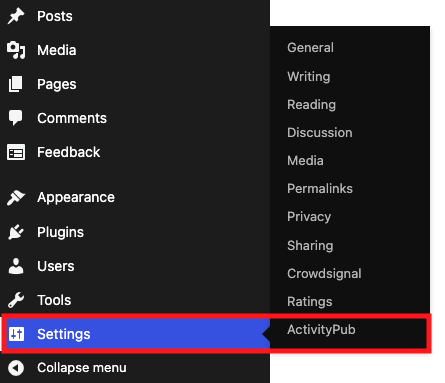
In your WordPress admin area, navigate to Settings and look for the ActivityPub option. Click there and follow the steps to make your site part of the Fediverse.
Using It
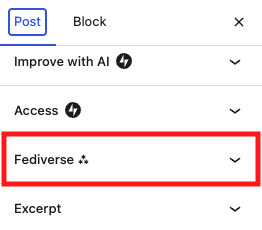
Now, every time you write a new post, you’ll see the Fediverse option under the Post tab. From there, you can choose how you want the post to appear across the network.
As you can see in the image below, there are settings for everything—from adding a Content Warning to choosing not to share a specific post at all.
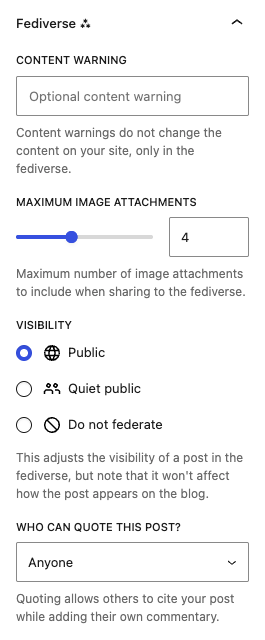
When you decide to federate a post, it becomes visible to all Fediverse members, regardless of the service they use. Moreover, they can comment on your post from their platform of choice, and that reply will automatically be added to your blog’s comment section.
A real-world example is the WordPress-powered blogs I follow on Mastodon. When they publish, I see it on my Mastodon timeline. I can reply right there, and my response becomes a comment on their blog—all without ever leaving Mastodon.
I’ve been using the Fediverse since 2022, and integrations like this still blow my mind.
Further Integrations
The ActivityPub feature is available even on the free tier. However, if you are on a WordPress plan that allows for a custom domain and plugin installations, things get even better.
For instance, you can use your own domain as your ActivityPub handle (e.g., @vladcampos@vladcampos.com). Depending on your tier, you can even set individual handles for other writers on your site.
That’s it. Turn it on, join the astonishing world of decentralized social media, and have fun.