How to instal the DeDRM_tools plugin
2025-11-12 13:44
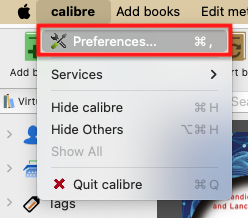
Download the DeDRM_tools plugin, unzip the folder, and set it apart. Next, go to the `Preferences` under the `Calibre` menu option. At the bottom of the page, you'll see the `Plugins` button. Click on it. Next, click on the button Load plugin from file.
Navigate to the DeDRM_tools folder on your computer, find and select the DeDRM_plugin.zip file. Click on Open, and you'll see a dialog box asking if you are sure. Click on Yes and in the next dialog box, also on OK.
Now we need to provide the plugin with your Kindle serial number. There are many plugins already installed, so if, for some reason, you can't see the one we just installed, simply search for DeDRM. Select it and click on the Customize Plugins button and then on Kindle eink ebooks.
You will be asked for your Kindle Serial Number. Add the serial number to the box, and that's it.